작업환경 : Spring Framework + thymeleaf + jqgrid
jqGrid 를 이용해 출력된 데이터를 바로바로 수정하고 싶다.
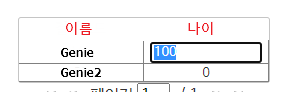
jqGrid 의 수정기능을 사용해 적용했다 아래 코드로 하면 cell 더블 클릭 후 값을 입력하고 엔터키를
누르면 즉시 수정되는 코드이다.
나중에 다시 사용하기 위해 아주 간단한 흐름으로 정리했다~ !
* 미래의 나를위한 메모 *
실제 파일에서 사용된 텍스트를 포스팅을 위해 customer 변경한 부분이 있음 에러가 있다면 알아서 수정해서 쓰기!
Controller
@Controller
@RequestMapping("/customer")
public class CustomerContorller {
	@Autowired CustomerService customerService;

	@RequestMapping(value = "/getList", method = RequestMethod.POST)
	public ModelAndView getList() {
		ModelAndView mv = new ModelAndView("jsonView");
        mv.addAllObjects(customerService.getList());
        return mv;
	}

	@RequestMapping(value = "/mod", method = RequestMethod.POST)
	public @ResponseBody Map<String, Object> mod(customerVO customerVO) {
	        return customerService.mod(customerVO);
	}

	@RequestMapping(value="/getMainPage", method= RequestMethod.POST)
	public ModelAndView customerMain() {
        ModelAndView mv = new ModelAndView("customer/main");
        return mv;
    }
}
Service
@Service
public class CustomerService {
	private static final Logger logger = LoggerFactory.getLogger(CustomerService.class);

	@Autowired protected CustomerDAO customerDAO;

	public ModelMap getList()  {
		ModelMap mv = new ModelMap();
        try {
            mv.addAttribute("rows", customerDAO.list());
        } catch (Exception e) {
            logger.error("{}", " 리스트 조회 실패 - " + e.getMessage());
        }
		return mv;
	}


	@Transactional
	public Map<String, Object> reg(CustomerVO customervo) {
		Map<String,Object> resMap = new HashMap<String,Object>();
		try {
			if(StringUtils.isEmpty(customervo.getName()) || customervo.getAge() == null ) {
				throw new Exception();
			}
			customerDAO.reg(customervo);
			resMap.put("res", "SUCCESS");
		 } catch (Exception e) {
			resMap.put("res", "FAIL");
			 logger.error("{}", "등록 실패 - " + e.getMessage());
        }
		return resMap;
	}

	@Transactional
	public Map<String, Object> mod(CustomerVO customervo){
		Map<String,Object> resMap = new HashMap<String,Object>();
		try {
			if(StringUtils.isEmpty(customervo.getName()) || customervo.getAge() == null ) {
				throw new Exception();
			}

			customerDAO.mod(customervo);
			resMap.put("res", "SUCCESS");
		 } catch (Exception e) {
			resMap.put("res", "FAIL");
			 logger.error("{}", "수정 실패 - " + e.getMessage());
        }
		return resMap;
	}
}
DAO
@Repository("CustomerDAO")
public interface CustomerDAO {

    public List<CustomerVO> list();
    public int reg(CustomerVO customervo);
    public int mod(CustomerVO customervo);
    public int del(CustomerVO customervo);

}
main.html
<script src="/js/customer.js?20210126"></script>

<div id="div_customer">
    <br/>
    <div id="div_customer_jqgrid">
        <table border="1" id="tbl_customer" style="overflow: auto" summary="고객 목록 조회."></table>
        <div id="pager_customer"></div>
    </div>
    <div id="div_customer_page"></div>
</div>
customer.js
$(function(){
	selectCustomer();
});


var selectCustomer = function () {
    $("#tbl_customer").jqGrid('GridUnload');

    $("#tbl_customer").jqGrid({
        url: '/customer/getList',
        ajaxGridOptions: {contentType: 'application/json; charset=utf-8'},
        mtype: "POST",
        postData: {},
        serializeGridData: function (postData) {
            return JSON.stringify(postData);
        },
        datatype: 'json',
        height: 'auto',

        cellEdit: true,
        cellsubmit: "remote",
        cellurl: "/customer/mod",
        beforeSubmitCell : function(rowid, cellname, value) {   // submit 전
            return {"name":rowid, "age":value}
        },
        width: '50%',
        shrinkToFit: false,
        multiselect: false,
        gridview: true,
        colNames: ['이름', '나이'],
        colModel: [
            {
                name: 'name',
                index: 'name',
                width: 120,
                align: 'center',
                title: false,
                sortable: false,
                resizable: true,
                key: true

            },
            {
                name: 'age',
                index: 'age',
                width: 120,
                align: 'center',
                title: false,
                sortable: false,
                resizable: true,
                editable:true,
                editoptions:{ dataInit: function(element) {userClassCode_number(element);}}
            },
        ],
        viewrecord: true,
        rowNum: 20,
        pager: "#pager_customer",
        emptyrecords: "Nothing to display",
        jsonReader: {
            page: 'page',
            total: 'total',
            root: 'rows',
            records: 'records',
            repeatitems: false,
        },
        beforeRequest: function () {
            $("#pager_customer").hide();
        },
        gridComplete: function () {
            $("#pager_customer").appendTo('#div_customer_page');
            $("#pager_customer").show();
        },
        loadComplete: function (data) {
            $("#div_customer_jqgrid").css("visibility", "visible");
        },
        loadError: function (xhr, status, error) {
            console.log(xhr);
        },
    });
}

//숫자만 입력 가능하게
function userClassCode_number(element){
    $(element).keyup(function(){
        var val1 = element.value;
        var num = new Number(val1);
        if(isNaN(num)){
         element.value = '';
        }
       });
}
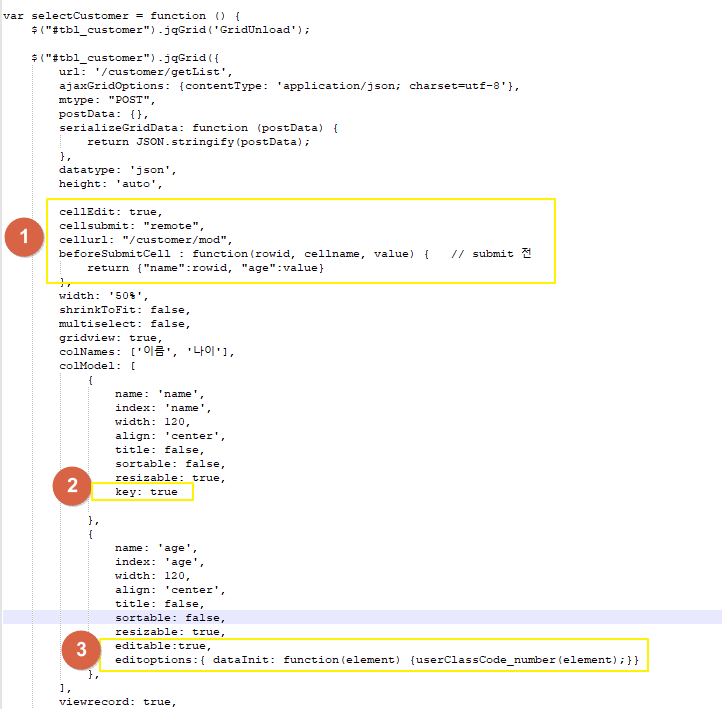
1번 동그라미를 보자
cellEdit: true, 수정기능을 사용학 위한 옵션이다.
cellsubmit: "remote", cellsubmit은 두 가지 속성 'remote'와 'clientArray'가 있는데 remote는
cellurl: "/customer/mod" AJAX 통신할 url
beforeSubmitCell : function(rowid, cellname, value) { return {"name":rowid, "age":value} }, AJAX 통신전에 보낼값을 담아준다.
2번 스탬프를 보면 key : true 설정이 되어있는데 row에서 key 값으로 사용할 데이터에 넣어준다.
이건 나중에 데이터를 수정하는 경우 DB에 pk 키로 사용된다고 보면된다.
즉 where 절에 사용될 값으로 설정한다고 생각하면 쉽겠다.
3 수정기능을 사용할 cell 에 설정을 추가해준다. editeditoptions 는 입력받은 데이터 타입을 설정하기 위해서 사용했다.
나이를 숫자로만 받기위해서 사용함~
# 참고
1004lucifer.blogspot.com/2019/05/jqgrid-cell.html
areumtb.tistory.com/153