Centos7 Springboot 프로젝트를 띄우는 기준으로 설명합니다. 참고하세요~!
apache 위치로 이동한 후
httpd.conf 파일을 열어 아래 모듈의 주석을 풀어준다.
vi httpd.conf
LoadModule alias_module modules/mod_alias.so
LoadModule rewrite_module modules/mod_rewrite.so
LoadModule jk_module modules/mod_jk.so
vi apache/conf/workers.properties
worker.list=mysitebalancer


worker.mysitebalancer.type=lb
worker.mysitebalancer.balance_workers=mysite

worker.mysite.type=ajp13
worker.mysite.host=127.0.0.1
worker.mysite.port=8015  ---> spring ajp 포트에 설정해줄 값
worker.mysite.lbfactor=1
* Spring 에서 ajp 포트 설정 예시
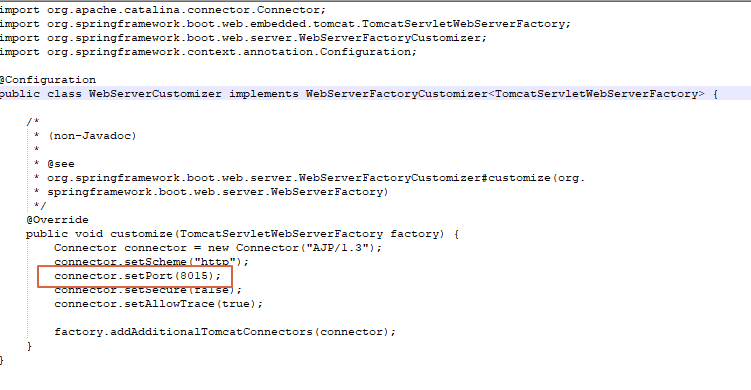
import org.apache.catalina.connector.Connector;
import org.springframework.boot.web.embedded.tomcat.TomcatServletWebServerFactory;
import org.springframework.boot.web.server.WebServerFactoryCustomizer;
import org.springframework.context.annotation.Configuration;

@Configuration
public class WebServerCustomizer implements WebServerFactoryCustomizer<TomcatServletWebServerFactory> {

	/*
	 * (non-Javadoc)
	 *
	 * @see
	 * org.springframework.boot.web.server.WebServerFactoryCustomizer#customize(org.
	 * springframework.boot.web.server.WebServerFactory)
	 */
	@Override
	public void customize(TomcatServletWebServerFactory factory) {
		Connector connector = new Connector("AJP/1.3");
		connector.setScheme("http");
		connector.setPort(8015);
		connector.setSecure(false);
		connector.setAllowTrace(true);

		factory.addAdditionalTomcatConnectors(connector);
	}
}
httpd.comf 제일 아래쪽에 아래 코드를 추가해준다.
<IfModule jk_module>
  JkWorkersFile conf/workers.properties

  JkShmFile run/mod_jk.shm
  JkLogFile "|/usr/local/apache/bin/rotatelogs /usr/local/apache/logs/mod_jk.log-%Y-%m-%d 86400 +540"
  JkLogLevel error
  JkLogStampFormat "[%a %b %d %H:%M:%S %Y]
  </IfModule>
  <IfModule unixd_module>

  User daemon
  Group daemon

</IfModule>
vi apache/conf/extra/httpd-vhost.conf
-- ssl 인증서 없이 사용할 경우
<VirtualHost *:80>
  ServerName mysite.co.kr
  ServerAlias www.mysice.co.kr
  DocumentRoot /home/test/htdocs
  <Directory /home/test/htdocs>
                Order allow,deny
                Allow from all
                Options FollowSymLinks
                AllowOverride All
                Require all granted
    </Directory>

   JkMount /* mysitebalancer  -->  사용하지 않는 경우 삭제해도 됨.
</VirtualHost>


-- ssl 인증서 사용할 경우 http -> https로 리다이렉트
<VirtualHost *:80>
  ServerName mysite.co.kr
  ServerAlias www.mysice.co.kr
  DocumentRoot /home/test/htdocs
  <Directory /home/test/htdocs>
                Order allow,deny
                Allow from all
                Options FollowSymLinks
                AllowOverride All
                Require all granted
    </Directory>
   RewriteEngine On
   RewriteCond %{HTTPS} off

   RewriteRule (.*) https://%{HTTP_HOST}%{REQUEST_URI}
  # JkMount /* mysitebalancer
</VirtualHost>
vi apache/conf/extra/httpd-ssl.conf
<VirtualHost *:443>
  ServerName mysite.co.kr
  ServerAlias www.mysice.co.kr
  SSLEngine on
  SSLCertificateFile conf/cert/mysite/mysite.co.kr.crt
  SSLCertificateKeyFile conf/cert/mysite/mysite.co.kr.key
  SSLCACertificateFile conf/cert/mysite/chainca.crt
  DocumentRoot /home/test/htdocs
    <Directory /home/test/htdocs>
                Order allow,deny
                Allow from all
                Options FollowSymLinks
                #Options Indexes
                AllowOverride All
                Require all granted
    </Directory>

    JkMount /* mysitebalancer
</VirtualHost>
apachectl configtest 명령어로 설정에 문제가 없는지 확인해본다.
"Syntax OK " 가 나온다면
아파치 재실행 후 확인해보면 된다. httpd - k restart
'각종 설정방법' 카테고리의 다른 글
| SSH, FTP 접속 느리다면! 참고하세요 (0) | 2020.11.18 |
|---|---|
| 아이폰 충전기 usb 장치 인식 실패 (0) | 2020.10.26 |
| 오라클 VM 외부 접속 설정하기. (0) | 2020.08.18 |
| Oracle VM 설치방법 - Centos 8 (0) | 2020.08.18 |
| Window 에 웹서버 설치하기 (Apache) (0) | 2020.08.12 |