나의 작업환경 

Apache/2.4.46 (Unix) 
CentOS Linux release 7.4.1708 (Core) 


1. ssl key ftp를 통해서 서버에 저장한다.

디렉토리 생성 명령 : mkdir 디렉토리명
나의 경로 : /usr/local/ssl_key/


2. httpd.conf 파일의 주석 해제 

LoadModule ssl_module modules/mod_ssl.so
LoadModule socache_shmcb_module modules/mod_socache_shmcb.so
Include conf/extra/httpd-ssl.conf


3. httpd-ssl.conf 수정

# 주석해제 ( 이건 안해도 된다.)
SSLRandomSeed startup file:/dev/urandom 256
SSLRandomSeed connect builtin


# 포트설정 
# 기본 Listen 443
Listen 9443 --나는 9443으로 받을 예정 

# virtualHost 설정 

<VirtualHost *:9443>
  ServerName www.myservice.com
  ServerAlias myservice.com
  SSLEngine on
  SSLCertificateFile /usr/local/ssl_key/myservice.com.crt
  SSLCertificateKeyFile /usr/local/ssl_key/myservice.com.key
  SSLCACertificateFile /usr/local/ssl_key/chainca.crt
  DocumentRoot /home/mytest/test
 #   <Directory /home/mytest/test>
 #              Order allow,deny
 #               Allow from all
 #              Options FollowSymLinks
 #               #Options Indexes
 #               AllowOverride All
 #               Require all granted
 #  </Directory>
</VirtualHost>


4. Apache 환경 설정 테스트

apachectl configtest 


"Syntax OK" 가 나오면 아파치를 실행 해준다. 


5. Apache 실행 

apachectl start


브라우저를 열고 접속해보기

https://192.168.11.22:9443  -- 192.168.11.22는 본인 아이피 넣으면 된다. 


안된다면?

1. httpd 가 실행 되고있는지 확인 netstat -ntlp

2. 방화벽 확인하기

참고 : genie-dev.tistory.com/60


방화벽은 열렸는데 Apache Connection 안되는 경우

* 리눅스 상단에 별도의 방화벽이 있다면 리눅스 자체의 방화벽 기능을 꼭 사용하지 않아도 된다. 나는 상단에 별도의 방화벽이 설정되어 있고 해당 방화벽은 오픈되어 있는 상태이다. 웹서버를

genie-dev.tistory.com


Centos7 Springboot 프로젝트를 띄우는 기준으로 설명합니다.  참고하세요~! 


apache 위치로 이동한 후 


httpd.conf 파일을 열어 아래 모듈의 주석을 풀어준다. 


vi httpd.conf 

LoadModule alias_module modules/mod_alias.so
LoadModule rewrite_module modules/mod_rewrite.so
LoadModule jk_module modules/mod_jk.so


vi apache/conf/workers.properties 

worker.list=mysitebalancer


worker.mysitebalancer.type=lb
worker.mysitebalancer.balance_workers=mysite

worker.mysite.type=ajp13
worker.mysite.host=127.0.0.1
worker.mysite.port=8015  ---> spring ajp 포트에 설정해줄 값 
worker.mysite.lbfactor=1


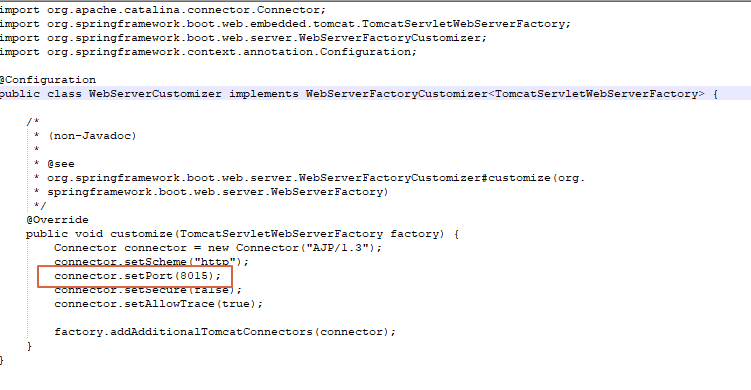
* Spring 에서 ajp 포트 설정 예시 

import org.apache.catalina.connector.Connector;
import org.springframework.boot.web.embedded.tomcat.TomcatServletWebServerFactory;
import org.springframework.boot.web.server.WebServerFactoryCustomizer;
import org.springframework.context.annotation.Configuration;

@Configuration
public class WebServerCustomizer implements WebServerFactoryCustomizer<TomcatServletWebServerFactory> {
	
	/*
	 * (non-Javadoc)
	 * 
	 * @see
	 * org.springframework.boot.web.server.WebServerFactoryCustomizer#customize(org.
	 * springframework.boot.web.server.WebServerFactory)
	 */
	@Override
	public void customize(TomcatServletWebServerFactory factory) {
		Connector connector = new Connector("AJP/1.3");
		connector.setScheme("http");
		connector.setPort(8015);
		connector.setSecure(false);
		connector.setAllowTrace(true);

		factory.addAdditionalTomcatConnectors(connector);
	}
}


httpd.comf 제일 아래쪽에 아래 코드를 추가해준다. 

<IfModule jk_module>
  JkWorkersFile conf/workers.properties

  JkShmFile run/mod_jk.shm
  JkLogFile "|/usr/local/apache/bin/rotatelogs /usr/local/apache/logs/mod_jk.log-%Y-%m-%d 86400 +540"
  JkLogLevel error
  JkLogStampFormat "[%a %b %d %H:%M:%S %Y]
  </IfModule>
  <IfModule unixd_module>

  User daemon
  Group daemon

</IfModule>


vi apache/conf/extra/httpd-vhost.conf 

-- ssl 인증서 없이 사용할 경우 
<VirtualHost *:80>
  ServerName mysite.co.kr
  ServerAlias www.mysice.co.kr
  DocumentRoot /home/test/htdocs
  <Directory /home/test/htdocs>
                Order allow,deny
                Allow from all
                Options FollowSymLinks
                AllowOverride All
                Require all granted
    </Directory>
  
   JkMount /* mysitebalancer  -->  사용하지 않는 경우 삭제해도 됨.
</VirtualHost>


-- ssl 인증서 사용할 경우 http -> https로 리다이렉트 
<VirtualHost *:80>
  ServerName mysite.co.kr
  ServerAlias www.mysice.co.kr
  DocumentRoot /home/test/htdocs
  <Directory /home/test/htdocs>
                Order allow,deny
                Allow from all
                Options FollowSymLinks
                AllowOverride All
                Require all granted
    </Directory>
   RewriteEngine On
   RewriteCond %{HTTPS} off

   RewriteRule (.*) https://%{HTTP_HOST}%{REQUEST_URI}
  # JkMount /* mysitebalancer
</VirtualHost>


vi apache/conf/extra/httpd-ssl.conf 

<VirtualHost *:443>
  ServerName mysite.co.kr
  ServerAlias www.mysice.co.kr
  SSLEngine on
  SSLCertificateFile conf/cert/mysite/mysite.co.kr.crt
  SSLCertificateKeyFile conf/cert/mysite/mysite.co.kr.key
  SSLCACertificateFile conf/cert/mysite/chainca.crt
  DocumentRoot /home/test/htdocs
    <Directory /home/test/htdocs>
                Order allow,deny
                Allow from all
                Options FollowSymLinks
                #Options Indexes
                AllowOverride All
                Require all granted
    </Directory>

    JkMount /* mysitebalancer
</VirtualHost>


apachectl configtest  명령어로 설정에 문제가 없는지 확인해본다. 

"Syntax OK " 가 나온다면 


아파치 재실행 후 확인해보면 된다. httpd - k restart


@ 주제 

Same-Origin Policy 이란 무엇인가 


@ 목적 

CORS 작업을 진행하며 알게된 내용 정리 


@ 내용 

Same-Origin Policy 

동일 출처 정책(same-origin policy)은 자바스크립트 코드가 웹 콘텐츠와 상호 작용을 할 수 있다는 사실 전반에 걸친 폭넓은 보안 제약 사항이다. 이 정책은 일반적으로 <iframe>요소를 포함한 웹 페이지나 새로운 브라우저 창이 열릴 때 작동하는데, 한 창이나 프레임의 코드는 동일 출처 정책의 감독하에 다른 창이나 프레임과 상호작용한다. 다시 말해서 자바스크립트는 스크립트를 포함하고 있는 문서와 같은 출처의 문서에 있는 window와 Document 객체의 속성만을 사용할 수 있다. 


문서의 출처는 불러온 URL의 프로토콜과 호스트, 포트로 정의한다. 다른 여러 서버에서 불러온 문서는 출처가 다르다.  같은 호스트에 포트만 다른 서버에서 불러온 문서도 출처는 다르다. 또한 http: 프로토콜을 사용해서 불러온 문서는 https:프로토콜을 사용해서 불러온 문서와 출처가 다르다.


그러나 스크립트 파일의 출처는 동일 출처 정책과 전혀 관계가 없다. 중요한 것은 스크립트를 포함하고 있는 문서의 출처다.


+ Recent posts